 Broken Link Checker
Chrome extension · free on the Chrome Web Store
Check broken links from your browser
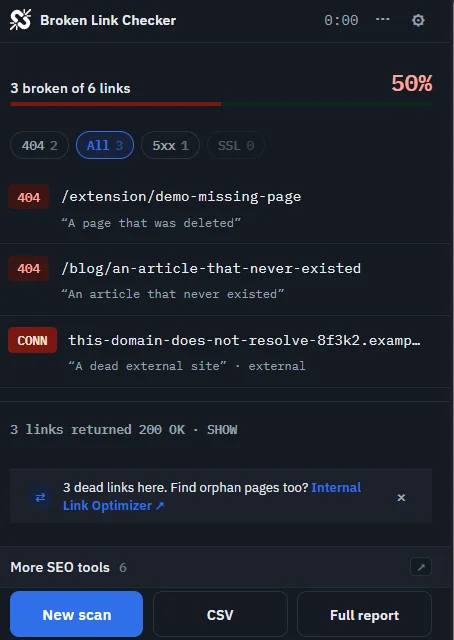
Open any page, click the extension, and see every broken link stream in. Highlight each one on the page. A side panel stays open while you fix them. Same crawler as the web app, so blocked hosts never show as broken.
What does the extension do?
Scan this page or the whole site
Pick the mode, click Scan. The crawl runs on our servers, so nothing slows your browser. Scan a page or a site shows each screen.
Highlight on the page
Click Highlight on a result and the page scrolls to that link. It gets a red outline for four seconds in the tab you scanned. Highlight and the side panel explains both tools.
Side panel that stays open
Results grouped by status, with keyboard shortcuts to highlight, open, copy and ignore. It stays put while you fix links in another tab.
One account, one quota
Sign in on brokenlinkchecker.io once. Scans spend the same monthly pool as the web app.
Full report in one click
Every scan has a report page on the site with source pages, anchors and status codes.
Dark mode
The Auto theme follows your Chrome theme by default. Pick Light or Dark in Options whenever you like.
What does it cost?
The extension is free on the Chrome Web Store. Without an account you get 1 page scan a day. Sign in with a free account and you share the web app's free tier. That means 500 pages per site scan and 50 scans a month. Guest mode and signing in compares both. Install the extension takes you through setup, and Extension privacy lists what leaves your browser.
Get it on the Chrome Web Store →Scan your site today, no install needed
The web scanner checks any site now. Free for 250 pages, results in seconds.