 Broken Link Checker
Free Broken Link Checker
Broken Link Checker scans your website and finds every broken link, dead link and 404 error. Results stream in live. Free for 250 pages. No account and nothing to install.
- Finds 404s, server errors and soft 404s
- Works on the web and in WordPress, Shopify app on the way
- Part of 7 free SEO tools in one account
What is a broken link checker?
A broken link checker is a tool that scans a website and tests every link to find the ones that no longer work. It reports each dead link with its status code, the three-digit reply a server sends, like 404 for a missing page. You can run our online broken link checker free on any site, up to 250 pages.
How does the broken link checker work?
Enter a URL
Paste any website address and press Scan. The crawl starts right away.
We crawl your site
To crawl means to visit pages one by one, the way search engines do. The crawler reads your XML sitemap first, then follows your internal links. It is the simplest way to crawl a site for broken links.
Fix what we find
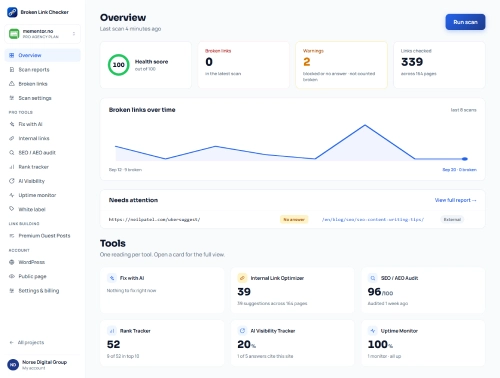
Each broken link shows its status code, its source page and its anchor text, the clickable words of a link. You know exactly where to go and what to change.
What does a broken link report look like?
Every scan makes a full report. Each broken link shows where it lives on your site and what text it hides behind. Send it to a client or a developer with one link.
See the full sample report →What can the checker do?
Sitemap crawling
Reads your XML sitemap first, then follows internal links, so no page on your site gets missed.
Exclude patterns
Skip URLs by pattern, like /tag/* or tracking links. The scan spends its time where it matters.
Live results
Broken links appear the moment the crawler finds them. You can start fixing before the scan ends.
Shareable reports
Every scan gets a link you can send to anyone. The report stays unlisted, so search engines do not show it. Reports and public pages
Soft-404 and SSL checks
Finds pages that claim to load fine but show an error, plus expired or broken SSL certificates.
Scheduled monitoring
PROA weekly scan checks your site every Monday. When it finds new broken links, you get an email that morning. How weekly scans work
One account, seven SEO tools
Every tool runs on the web and in WordPress, with Shopify on the way. One account covers all seven.
Use it on the web, in WordPress, in Chrome, and soon on Shopify
WordPress plugin
The plugin brings your account into wp-admin. Fix broken links right in the post editor. Free on WordPress.org. Plugin docs
Get the plugin →Shopify app
Coming soon. It finds dead product and collection links before your customers do.
See what's coming →Chrome extension
Free on the Chrome Web Store. Scan the page in your tab and highlight broken links. A side panel stays open while you fix them. Extension docs
Get the extension →Broken links, explained
What is a broken link?
A broken link points to a page that no longer loads. The server answers with an error code, usually a 404. Visitors hit a dead end, and search engines waste a visit.
What is a soft 404?
A soft 404 is a page that says it loaded fine but shows an error message. Search engines treat these pages as low quality. Standard checkers miss them. This one reads the page content to catch them.
How common are dead links?
Very common, even on well-kept sites. Pew Research Center found that 25% of web pages that existed between 2013 and 2023 were gone by October 2023. About 8% of pages only one year old were already dead. Ahrefs found that at least 66.5% of links pointing to sites over the past nine years are dead.
How do broken links hurt SEO?
Broken links waste crawl budget, the number of pages a search engine will visit on your site. They leak link value, the ranking strength that flows between pages. And they push visitors away. That is why broken links and SEO problems go hand in hand. Read what Google says about broken links and SEO.
Which status codes matter?
404 and 410 mean the page is gone. 5xx codes mean the server failed. 301 and 302 redirects work, but review them when they chain.
What does Broken Link Checker cost?
Free
$0no card needed- 250 pages per scan
- 2 scans a day, no account needed
- 50 scans a month with a free account
Pro Personal
$4.08/mo$49 billed yearly- One Pro site
- 200 scans a month
- AI link fixes and email alerts
Pro Business
$8.25/mo$99 billed yearly- Five Pro sites
- Unlimited scans
- White-label reports
Pro Agency
$24.92/mo$299 billed yearly- 250 Pro sites
- Unlimited scans
- 1,000 rank-tracked keywords
Monthly billing is available on every plan, from $5.95 a month.
Compare all plans →Common questions about broken links
How can I check if a link is broken?
Paste the page URL into the scan box above and press Scan. The checker tests every link on that page and shows the broken ones in seconds. For a single link, you can also open it in your browser. If you see a 404 error or an empty page, the link is broken.
How do I verify broken links on my website?
Run a full site scan, then open each flagged link in your browser to confirm it fails. The report shows the status code, the source page and the anchor text for every dead link. That makes it easy to check for broken links on your website and prove each one before you fix it.
Is a broken link checker free?
Yes. Our free broken link checker covers 250 pages per scan with no account and no install. Free accounts get 50 scans a month. Paid plans add weekly scans, email alerts and AI link fixes. Most small sites never need more than the free plan.
What is a dead link checker?
A dead link checker is another name for a broken link checker. Some people also call these tools a 404 checker. They all do the same job. They scan a site, test every link and find broken links before your visitors do.
How do I fix broken links?
Open the source page listed in the report and edit the link. Point it to a working page, update the URL, or remove the link. For pages that moved, add a 301 redirect, a signpost that sends visitors to the new address. WordPress users can fix broken links from the plugin without opening each post.
Do broken links affect SEO?
Yes. Broken links waste crawl budget, leak link value between your pages and push visitors away. Search engines read a site full of dead links as poorly maintained. Fixing them restores the flow of value and makes every crawl count. It is one of the fastest SEO wins on most sites. Our blog explains Google's position on 404 pages.
How many pages can I check for free?
The free scan covers 250 pages per site with no account and no signup. Free accounts get 50 scans a month. Most small business sites fit comfortably inside the free limit. Paid plans add more scans, weekly scans and email alerts.
Does it check external links?
Yes. With Check external links on, every outbound link on every crawled page gets tested. A free account can also check images, scripts and documents. External dead links are reported separately from internal ones. So you can fix your own pages first and deal with other sites later. Read how scanning works.
What is a soft 404?
A soft 404 is a page that returns a 200 success code but shows an error message like "page not found". Search engines flag these pages as low quality. The checker finds them by reading the page content, not just the status code.
Will fixing broken links improve SEO?
Yes, in three ways. Fixed links restore the flow of link value between your pages. Your crawl budget stops being wasted on dead URLs. And visitors stop hitting error pages, so fewer of them leave, a signal search engines watch.
How do I fix broken links in WordPress?
Install the Broken Link Checker plugin, run a scan, and edit or unlink each broken link from the report inside wp-admin, with no post-by-post hunting. The plugin lists the exact post and anchor text for every dead link, so each fix takes seconds.
Does it work on Shopify?
Yes. The web scanner checks any Shopify store today, free for 250 pages. A dedicated Shopify app is in development. It will scan products, collections, pages and blog posts from inside your admin, catching discontinued product URLs that still get traffic.
How often should I check for broken links?
Monthly for most sites, weekly if you publish often or link out heavily. Links rot fast. Pew Research found that about 8% of pages only one year old were already dead. Even a site you never touch collects broken links. Paid plans automate this with a weekly scan. How weekly scans work.
Try the free broken link checker now
Paste your URL and watch the results come in. Find your dead links and 404 errors in minutes, free for 250 pages.